When we built WarpStream, the goal was to redesign Apache Kafka® from the ground up in a way that was dramatically cheaper and easier to operate: stateless Agents, object storage, and no disks to manage or partitions to rebalance. But there has always been a catch: before you can run Kafka the easy way, you have to get there, and migrating an existing Kafka cluster to WarpStream can be notoriously difficult. A cluster rarely serves a single application, many teams produce and consume through it, and all of them have to be migrated with minimal disruption to production traffic.
At a high level, that work breaks down into three parts: migrating the data, migrating the consumers, and migrating the producers. The data has to be replicated without loss or reordering. Consumers need their group offsets carried over so they can resume where they left off. And producers, the hardest of the three, need to be moved quickly and with minimal downtime, since pausing them means halting durable writes, with real potential for data loss if anything goes wrong.
Part of this picture is already solved by Orbit, WarpStream's built-in replication feature, which makes migrating the data and the consumers easy. Orbit continuously replicates topic data and consumer group offsets from any source Kafka cluster into WarpStream while preserving the exact offset of every record.
This makes migrating consumers straightforward: since the data and committed offsets are replicated, Kafka consumers can simply switch their bootstrap URL from the source cluster to WarpStream and pick up exactly where they left off. There is no reprocessing, no skipped records, and no shared cutover window, because each consumer group can move whenever its team is ready.

That leaves the producers. Until now, migrating them was an entirely manual four-step process. It involved:
In practice, this usually translated to downtime and an operator watching a dashboard and deciding when it's safe to migrate. Worse still, because a single forgotten producer still writing to the source cluster means data loss, every team had to move together. Producers were the one part of migrating to WarpStream that still required a maintenance window.
Some of our most sophisticated customers that couldn't tolerate any migration downtime wrote custom scripts and modified their application code to leverage dynamic feature flags to automate the migration as much as possible. Some even used clever tricks like applying ACLs on the source cluster as an automated "signal" to their application that it was time to instantiate a new client and cut over to WarpStream.
We wanted to solve this problem once and for all for our customers, but many of the automated solutions that our customers came up with weren't practical solutions for us. We couldn't rewrite each of our individual customer's applications to use dynamic feature flags, for example.
Another potential solution was for us to provide our customers with custom WarpStream "fat clients" that they could embed in their applications that would automate the migration process for them, but that had its own challenges as well. The clients would have to work in every programming language, and for many of our enterprise customers getting many different teams to swap out the clients in their application was an impossible task.
As a result, we settled on a different approach: a proxy. Or more specifically, a very limited type of proxy that only does one thing: forward produce requests. We reasoned that customers could update the bootstrap URL for all of their applications to point to the WarpStream cluster, and then WarpStream would just forward those Produce requests to the source cluster. This way, every team could move at its own pace to update their application with zero downtime, but also it would allow us to concentrate all of the Produce traffic in a single location that we controlled so that we could automate steps 1 through 4 from above for our customers.
The result is Orbit Auto Migration: seamless migrations of Kafka producers from any source cluster to WarpStream with zero downtime, zero restarts, and zero maintenance windows. Producers update their bootstrap URL to point at the WarpStream cluster ahead of time, at whatever pace suits each team, and the WarpStream Agents transparently forward those Produce requests to the source Kafka cluster.
When an operator decides to migrate a topic, they click a button in the WarpStream UI and then the following steps happen automatically:
Automating the old manual process removes the downtime and coordination, but that alone does not make a migration seamless. The cutover itself still has to be safe to attempt and easy to unwind if something goes wrong, producers still have to be ready for a cluster that behaves differently than the one they were tuned for, and the migration has to stay visible throughout.
So, against this backdrop, how do you cut over thousands of producers without stopping any of them, without asking every team to move at once, and with a way to watch, abort, and roll back the migration at any point? The easiest way to explain it is to follow one topic through its migration journey, from start to finish.
At a high level, Auto Migration has two main components. In WarpStream's control plane, a migration controller runs a state machine for each topic and decides when it's safe to move from one stage of the migration to the next. In the data plane, every WarpStream Agent contains a proxy that can forward produce requests to the source cluster. The Agents continuously watch each topic's state and adjust how each produce request is handled accordingly.
Each topic's state machine moves through four states: <span class="codeinline">REJECT</span>, <span class="codeinline">PROXY</span>, <span class="codeinline">MIGRATING</span>, and <span class="codeinline">COMPLETE</span>.

Every topic that Orbit replicates starts out in the <span class="codeinline">REJECT</span> state, where WarpStream refuses produce requests to it. While Orbit is copying records from the source, WarpStream's copy of the topic has to match the source record for record, offset for offset. A write from anywhere else would break that, so a producer that attempts to produce directly to the topic in WarpStream simply gets an error.
When Auto Migration is enabled for a topic, it moves to <span class="codeinline">PROXY</span>. This is the state in which producer applications actually update their bootstrap URLs to point to WarpStream whenever they're ready. The Agents see that the topic is in <span class="codeinline">PROXY</span> and forward every produce request to the source cluster. Orbit, meanwhile, keeps replicating the topic in the background from the source into WarpStream, bounding the replication lag between the two clusters. Because WarpStream Agents are stateless, any Agent can forward requests for any producer, and there is no dedicated proxy tier to size, scale, or fail over. A topic can sit in <span class="codeinline">PROXY</span> for as long as teams need, whether that is an afternoon or several months.
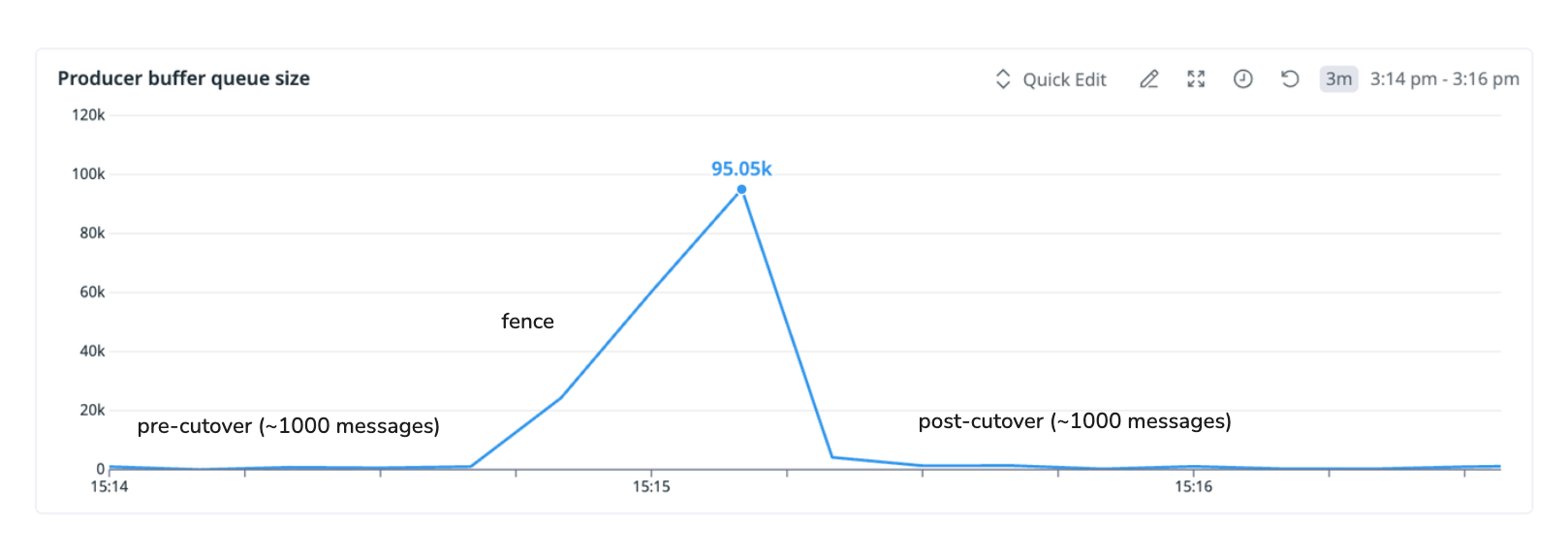
Once every producer has updated its bootstrap URL, the cutover can begin. When a cutover is initiated, the control plane first checks that replication lag is low; if WarpStream's copy of the topic is too far behind, the migration does not start. Otherwise the topic enters the <span class="codeinline">MIGRATING</span> state. The Agents pick up the state change, stop forwarding writes, and respond to every produce request for the topic with a retriable error. Producers end up in a brief holding pattern, holding their writes in client buffers and retrying automatically until the cutover completes and their writes go through, with nothing surfacing to the application.
While the producers retry, the control plane finalizes the cutover. It waits for every Agent to confirm that it has stopped forwarding writes for the topic and that any requests still in flight to the source cluster have finished. It then waits for Orbit to drain the remaining replication lag to zero, and verifies that every record the source cluster acknowledged now exists in WarpStream. Only when all of this has happened does the topic move to the <span class="codeinline">COMPLETE</span> state. The producers' next retry succeeds, and this time WarpStream serves the write itself. The whole window typically lasts on the order of seconds.
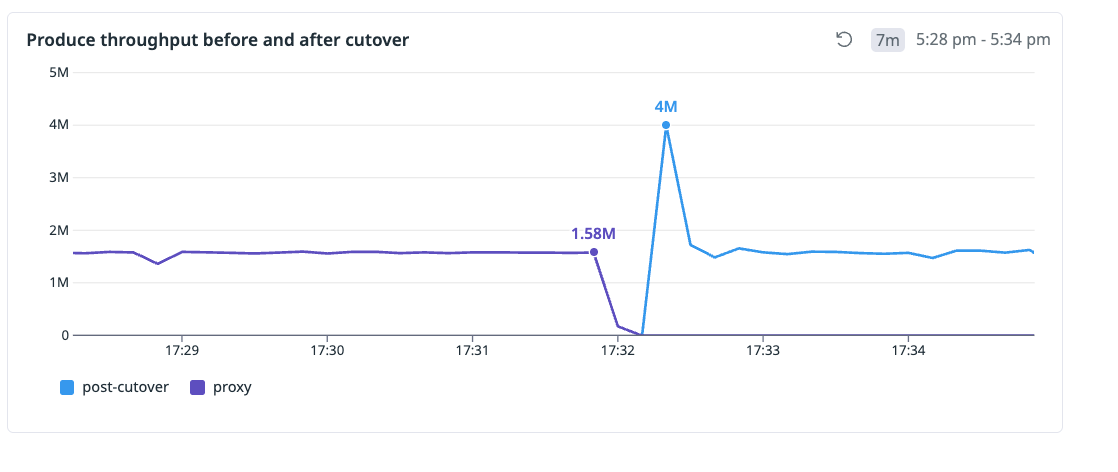
If the lag does not drain within the configured migration timeout, the topic automatically rolls back to the <span class="codeinline">PROXY</span> state. The Agents resume forwarding to the source, producers carry on as before, and the cutover can be retried later. A migration can also be aborted manually at any point before it completes.
Once a topic reaches <span class="codeinline">COMPLETE</span>, the migration is finished and the topic behaves like any other WarpStream topic. WarpStream serves its writes directly, Orbit stops managing it, and the proxy is no longer involved. Throughout all of this, no producer was ever stopped or restarted, and no data was lost.
A migration is a one-way door: once a topic has cut over and its producers are writing to WarpStream, there is no easy way back. Everything that could threaten the cutover like a mistuned producer, a missing ACL, or a forgotten writer, needs to surface as early as possible, and the process itself needs to stay visible and auditable throughout.
To truly make migrations stress-free for our customers, Auto Migration had to address each of these concerns as well, not just the mechanics of the cutover.
One potential surprise at cutover would be latency. WarpStream writes directly to object storage, so a produce request takes longer to acknowledge than it does on a disk-based Kafka cluster. Sustaining the same throughput at a higher latency means keeping more data in flight, which in practice means larger batches, more in-flight requests, and bigger buffers for records that are waiting to be acknowledged. The relationship is roughly <span class="codeinline">max throughput ≈ (in-flight requests × request size) / acknowledgement latency</span>, as per Little's law. A producer tuned for single-digit millisecond responses often has its queues and buffers sized too small for this, and when acknowledgements suddenly take hundreds of milliseconds, its maximum throughput can fall below the rate at which the application writes. Records enter the buffer faster than they leave it, causing it to fill, and the producer stalls or starts failing writes.
This is especially dangerous during a live migration, because producer settings are fixed at startup. The same configuration has to work both while the topic is proxied and after the cutover.
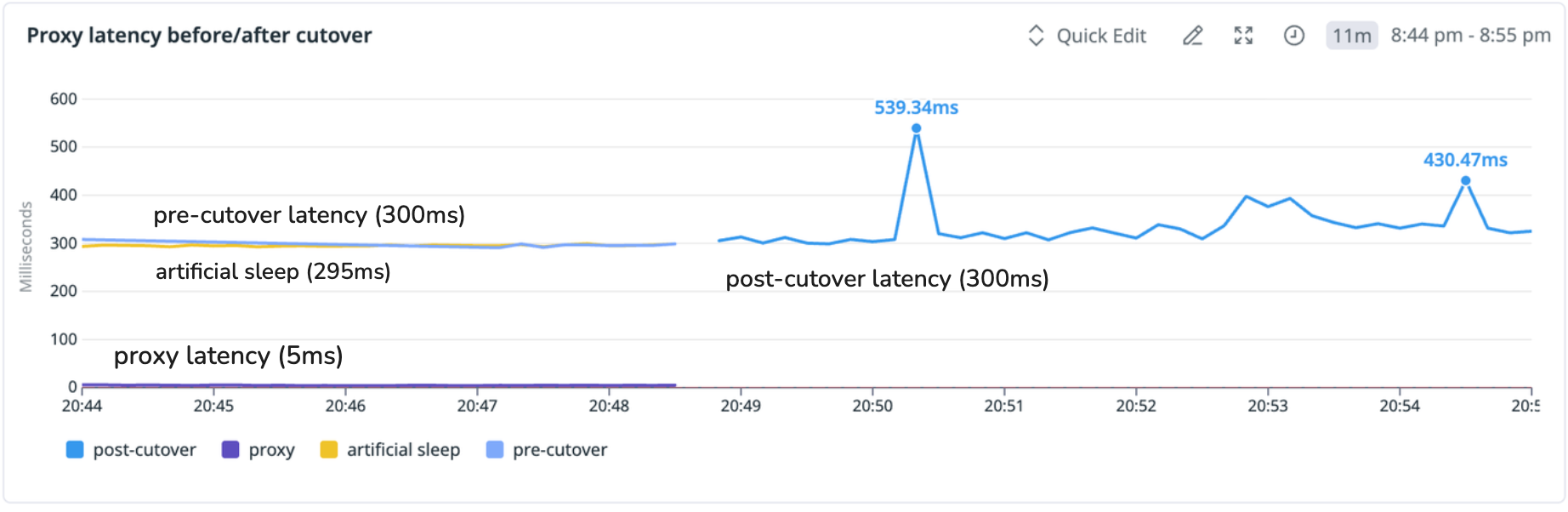
If proxied requests were serviced at the source cluster's latency, an untuned producer would behave perfectly through the entire proxy phase and only start failing after the cutover in the higher latency regime, exactly when there is no easy way to revert the migration.
To handle this, the proxy makes the latency producers' experience in <span class="codeinline">PROXY</span> similar to what they would see producing to WarpStream directly. For every proxied produce request, it estimates how long WarpStream itself would have taken to durably store the batch, accounting for the time spent batching, writing to object storage, and committing metadata, and it holds the response until that much time has passed. Producers still have to be tuned for WarpStream, with larger batches, more requests in flight, and bigger buffers. The difference is now teams can tune their producers early, during the proxy phase, with data still flowing safely to the source, instead of firefighting after the cutover. And because producers end up tuned in advance, latency barely changes at cutover, resulting in a smoother migration. This has already paid off in practice; it caught a misconfigured producer in one customer's migration well before their cutover.
Authentication and authorization follow a similar pattern. The proxy enforces both on every request i.e., a producer has to present valid WarpStream credentials and pass WarpStream's authorization checks before its write is forwarded, even though that write is ultimately served by the source cluster. A missing credential or an incomplete ACL therefore surfaces the first time a producer connects, rather than after the topic has migrated.
Ensuring that the pre- and post-migration regimes match removes one class of risk but the cutover itself carries another. While a topic is cutting over, its producers are retrying, which means their writes sit in client buffers and nothing is being stored durably. If a cutover were allowed to start while replication lag was high, that window could stretch from seconds into minutes, long enough to fill producer buffers and, in the worst case, run producers out of memory and drop data. So the control plane only starts a cutover when it is likely to finish quickly. When a migration is initiated, it checks the topic's replication lag and refuses to begin if it is too high. The check uses time lag rather than offset lag, because offset lag says little about how long a drain will take. A backlog of a million records might be a few seconds of production on a high-throughput topic or a week of production on a low-throughput one.
Time lag measures how far behind the copy is in time, and it translates directly into drain time, since a topic running ten seconds behind the source will drain in roughly ten seconds once writes are blocked. Anything that would not drain comfortably within the migration timeout is rejected up front, before its producers are affected at all. Together with the automatic rollback described earlier, this protects the cutover at both ends, as a migration only begins when it is likely to succeed and gracefully rolls back on its own when it does not.
The migration window itself needs to stay short for the same reason. Every moment it lasts is a moment producer writes wait in client buffers instead of being stored durably, and its length is decided almost entirely by how quickly Orbit drains the remaining lag. So we made the replication scheduler migration-aware. Topics that are cutting over are prioritized in the replication queue, ahead of everything else Orbit is copying. Topics migrate independently, so when several are cutting over at once, the one with the least remaining lag drains first (shortest-job-first), which minimizes the average time a topic spends in <span class="codeinline">MIGRATING</span>. Within a topic, the objective flips because a topic is only done when every one of its partitions has drained. So the partitions with the most lag drain first (longest-processing-time-first), giving the partition that decides the finish time a head start. Together, these keep the time producers spend retrying as short as possible.
Everything so far assumes that every producer for a topic has actually been re-pointed before its cutover begins. In practice, producers are scattered across teams and services, and often nobody has a complete list of where they all live. A forgotten producer that is still actively writing to the source cluster keeps the replication lag from ever draining to zero, leaving the topic's migration stuck in a loop of timeouts and rollbacks.
To make it easier to detect these forgotten producers, we made Orbit proxy-aware. The proxy attaches a small internal header to every record it forwards, and because Orbit sees every record on the source topic as it replicates, it can tell which records came through the proxy and which were written directly. If unproxied records keep appearing on a topic, WarpStream raises a diagnostic that names the topic, and the forgotten producer is found while there is still time to move it.
A more subtle case is a producer that writes only occasionally, like a cron job that runs every twelve hours. Because it produces nothing while the topic is proxied, there are no unproxied records for Orbit to flag, and because it produces nothing during the cutover, the replication lag drains normally and the migration completes cleanly. Then the cron job fires, and its records land on a source cluster that nothing is replicating anymore. To catch this, WarpStream snapshots the source topic's end offset at the moment the migration completes, and for the next 24 hours it keeps checking the source against that snapshot. If the offset ever advances, a diagnostic fires naming the topic. Catching a producer at that point is admittedly late, since the records it wrote are sitting on the wrong cluster, but an alert beats silently losing data, notifying the team to take action.
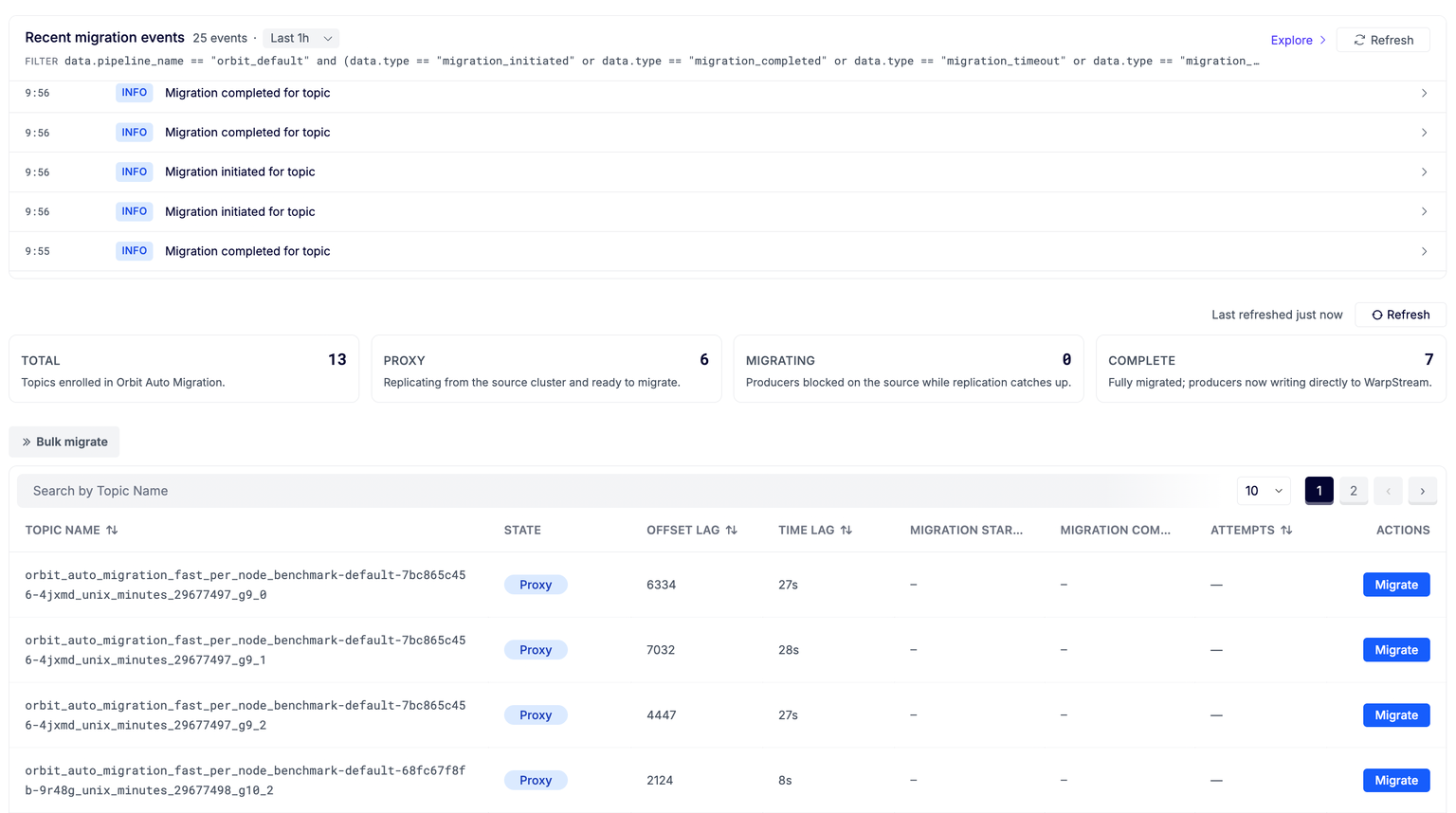
The same visibility extends to the migration itself. An event is emitted every time a migration is initiated, completes, times out, fails, or is aborted, so the full history of who started what, when, and how many attempts it took is written as it happens rather than pieced together afterwards.
Making all of this work correctly, and keeping it performant at the scale of real production clusters, meant solving a number of technical challenges.
One challenge was how to forward produce requests to the source cluster. A single request can carry batches for many partitions, and each of those partitions has its own leader among the source cluster's brokers.
The obvious approach is to hand the records to an off-the-shelf Kafka producer client pointed at the source, but a producer client does not pass records along untouched. It re-partitions, re-batches, and re-compresses them, retries them on its own schedule, and stamps them with its own producer identity. What arrives at the source is no longer the request the original producer made, and so the proxy has no way to build the exact response the producer is waiting for. Instead, the proxy handles every step of the forwarding itself, working directly with the raw requests and record batches. It keeps a cache of the source cluster's metadata, splits each incoming request by partition leader, forwards the producer's original batches to the right brokers in parallel, and reassembles the responses into a single answer for the client.
Another was knowing when it is actually safe to complete a cutover. Completing a migration too quickly can result in data loss. For example, if a record reaches the source cluster and the producer received an ack but the cutover completes before it has been replicated, that record is left behind, stranded on the source that Orbit is no longer replicating.
During the <span class="codeinline">MIGRATING</span> state, the control plane waits for the remaining replication lag to drain to zero, switches replication off for the topic, and lets WarpStream serve its writes directly. To avoid data loss, replication can only be switched off safely once every in-flight proxied write has either completed and been replicated, or been blocked, because a record that reaches the source afterwards will be stranded, as described above. The difficulty is that Agents learn about the state change asynchronously, so for a short while some Agents have stopped forwarding while others have not, and an Agent that is partitioned might hold a proxied write in flight far longer than expected.
Before completing a cutover, the control plane therefore waits for every Agent to confirm two things: (1) that it has started blocking writes for the topic, and (2) that every proxied request it had in flight has finished. Each Agent tracks its in-flight proxied requests and reports the topics it has blocked and drained through its regular heartbeats. The control plane does not proceed until every Kafka-serving Agent has confirmed both for the current migration attempt; any Agent that cannot report its state blocks the cutover.
All of this works for any Agent the control plane can hear from. An Agent that has stopped responding altogether reports nothing at all, and so that case must be handled separately.
That case is handled by the way an Agent learns a topic's state in the first place. Each Agent reads migration state through a local cache that it refreshes from the control plane every couple of seconds, and two rules govern how that cache may be used. An Agent will not forward a write based on a cache entry more than a couple of seconds old, and a forwarded write that does not complete within a few seconds of the cache read that admitted it is answered with a retriable error rather than a success, even if it later lands on the source. In effect, an Agent's permission to proxy a topic is a lease that expires within seconds, and the only way to renew it is to fetch the topic's current state. A partitioned Agent cannot renew, so it stops forwarding on its own, and anything it still has in flight is answered with a retriable error when its window runs out. An Agent that recovers renews its lease only by learning that the topic is now migrating, so it comes back fencing writes rather than forwarding them. Once a topic enters <span class="codeinline">MIGRATING</span>, every Agent that refreshes its cache starts blocking requests at once, and any Agent that cannot refresh loses the ability to forward within seconds as its lease runs out. The control plane waits out that window, after which no successful proxied write can exist anywhere, and only then measures the lag, drains it, and switches replication off. This guarantees that every write acknowledged to a producer reached the source while replication was still running, and was therefore replicated into WarpStream before the topic switched over. No acknowledged record is ever left behind.
There is one more twist. When a proxied request times out, the Agent has no way to know whether the write actually landed on the source cluster. The only safe answer is a retriable error, since telling the producer its write succeeded when it may not have is exactly the loss we set out to prevent. The producer retries, and if the original write did land, the topic ends up with a duplicate record. Trading lost data for occasional duplicates is the right tradeoff, and in any case, those duplicates would be dropped if Kafka's idempotency feature is enabled.
Supporting idempotent producer migrations raised two further problems. The first is that a producer's identity has to be valid on both clusters. An idempotent producer's ID is allocated by the cluster it connects to, but during a migration its writes must be accepted by the source while the topic is proxied and by WarpStream after the cutover. An ID issued by one cluster cannot simply be reused on the other, where it may collide with an ID already allocated to a different producer. So when a producer initializes, the Agent obtains an ID from the source cluster as well as from WarpStream and then stores the pair as a mapping in the WarpStream control plane. The producer only ever sees its WarpStream identity, and the proxy swaps in the source ID as it forwards each batch, so each cluster only ever sees the producer identity it issued itself.
The second problem with supporting Kafka's idempotent producer feature is the sequence state that idempotency depends on. To enforce it, a Kafka broker tracks the sequence number of the last batch it accepted for each tuple of <span class="codeinline">{producer_id, producer_epoch, partition}</span> and rejects anything out of order. Until the cutover, that state lives on the source cluster, and WarpStream has none of it, so if WarpStream began enforcing idempotency from a blank slate, every migrated producer would arrive mid-sequence and be rejected with an <span class="codeinline">OutOfOrderSequenceException</span>.
For the migration to be seamless, WarpStream's sequencer has to be hydrated with where every producer left off, just as Orbit already syncs consumer group offsets to carry over where every consumer left off. Every Kafka client tracks its own sequence numbers and carries them across the cutover unchanged, so when a producer's first batch for a partition arrives after the cutover, WarpStream adopts its sequence number as that producer's starting point and enforces the contract from there.
The blocking described earlier is what makes this safe. Because no write is acknowledged once a topic is cutting over, a producer's sequence counter cannot advance during the cutover, and the number it presents afterwards picks up exactly where the last acknowledged write left off.
The one twist is ordering. An idempotent producer can have up to five batches in flight at the moment of the cutover, and in rare cases they can arrive out of order, leaving the sequencer seeded from a batch that was not the producer's oldest. When that happens, the client eventually bumps its producer epoch and resends everything it has not had acknowledged. The cost of that recovery is at worst a duplicate record, but never a lost one, since a client never discards an unacknowledged batch. In our continuous testing, which runs full migrations end to end around the clock, the common client libraries pass through the cutover without surfacing a single error to the application.
Orbit Auto Migration is available today, on Agent versions <span class="codeinline">v826</span> and above. If you already run Orbit, there is nothing new to install. Just enable Auto Migration in your Orbit configuration, pick a topic, and take it through a migration end to end. The full details are in the docs here. You can learn more about Orbit Auto Migration in this video:

.svg)
