WarpStream is an Apache Kafka® protocol compatible data streaming platform built directly on top of object storage. As we discuss in the original blogpost, WarpStream uses cloud object storage as its sole data layer, delivering excellent throughput and durability while being extremely cost efficient.
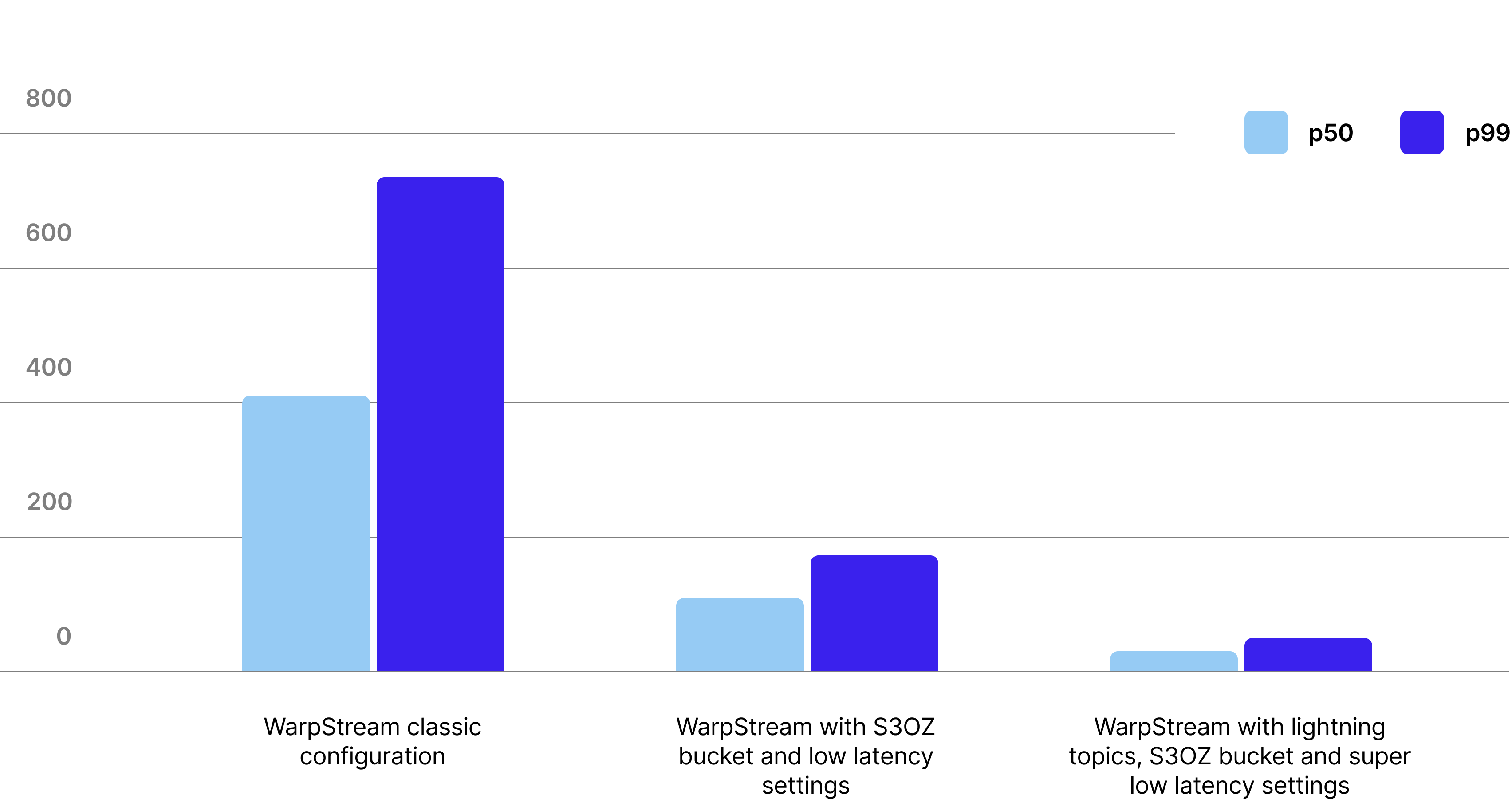
The tradeoff? Latency. The minimum latency for a PUT operation in traditional object stores is on the order of a few hundred milliseconds, whereas a modern SSD can complete an I/O in less than a millisecond. As a result, WarpStream typically achieves a p99 produce latency of 400ms in its default configuration.
When S3 Express One Zone (S3EOZ) launched (offering significantly lower latencies at a different price point), we immediately added support and tested it. We found that with S3EOZ we could lower WarpStream’s median produce latency to 105ms, and the p99 to 170ms.
Today we are introducing Lightning Topics. Combined with S3EOZ, WarpStream Lightning Topics running in our lowest-latency configuration achieved a median produce latency of 33ms and p99 of 50ms – a 70% reduction compared to the previous S3EOZ results. Best of all, Lightning Topics deliver this reduced latency with zero increase in costs.
We are also introducing a new Ripcord Mode that allows the WarpStream Agents to continue processing Produce requests even when the Control Plane is unavailable.
Lightning Topics and Ripcord Mode may seem like two unrelated features at first glance, but when we dive into the technical details, you will see that they are two sides of the same coin.
.png)
To understand how Lightning Topics work, we first need to understand the full lifecycle of a Produce request in WarpStream. When a WarpStream Agent receives a Produce request from a Kafka client, it executes the following four steps sequentially:
WarpStream’s latency is tunable. Specifically, the batch timeout in Step 1 can be configured as low as 25ms (10x lower than the default of 250ms), and low-latency storage backends like S3EOZ provide much lower latency than traditional object storage. In a typical “low-latency” configuration (50ms batch timeout and using S3EOZ), the produce latency roughly is roughly distributed as follows:
If we want to reduce the latency of Produce requests any further than ~100ms, one of these three variables has to give. In the normal “high latency” configuration mode of WarpStream, the Control Plane commit latency is a small fraction of the overall latency, but when WarpStream is configured with a low-latency storage backend (like S3EOZ) and a low batch timeout, the Control Plane latency dominates!
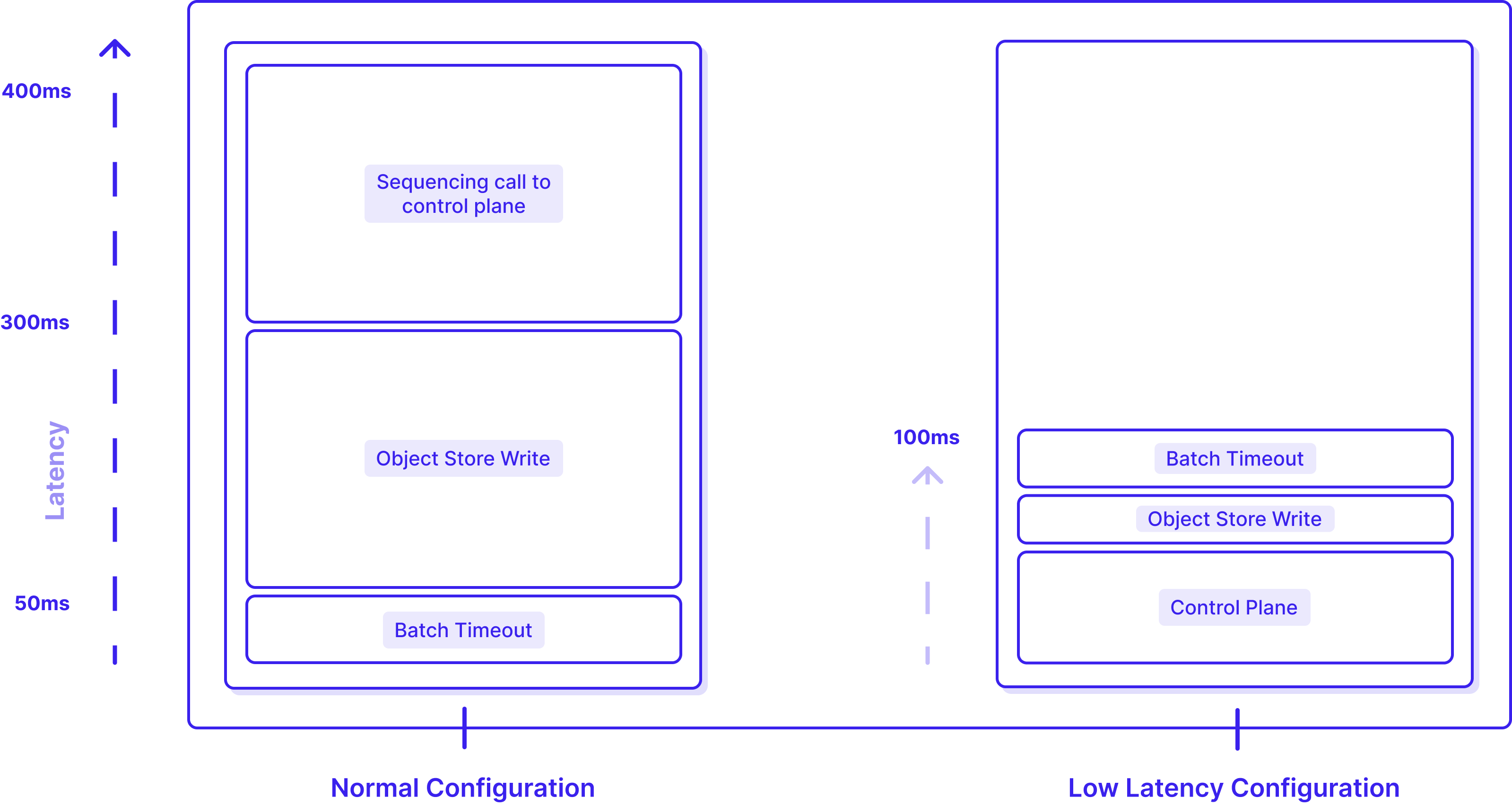
There are steps we could take to reduce the Control Plane latency, but zero latency is better than low latency, so we took a step back to see if we could do something more radical: remove the need to commit to the Control Plane in the critical path entirely. If we could accomplish that then we’d be able to cut the latency of Produce requests in the “low-latency” configuration by half!
Of course this begs the question: isn’t the Control Plane commit important? It wouldn’t be in the critical path otherwise. Earlier, we explained how the Control Plane is in the critical path of Produce requests so it can sequence the records and assign offsets that can be returned back to the client.
But what if we just didn’t return offsets back to the client? We’d still have to commit the file metadata to the Control Plane at some point, otherwise the records would never be assigned offsets, but that could happen asynchronously without blocking the Producer client.
It turns out this isn’t a novel idea!
Lightning Topics are loosely based on an idea developed in the LazyLog paper. The key idea in the LazyLog paper is that every log needs: (1) durability and (2) ordering, but that while durability needs to be ensured upfront, sequencing rarely does.
More specifically, sequencing must complete before records are consumed from the log, but it is not necessary to wait for sequencing to complete before returning a successful acknowledgement to clients producing to the log unless those clients need to know the exact offset of the records they just produced. It turns out, producer clients almost never need that information.
And this is exactly what WarpStream Lightning Topics do: the call that commits the new files to the Control Plane is executed lazily (asynchronously) so that the records are eventually sequenced and can be consumed, but it’s not a prerequisite for successfully acknowledging a Produce request.
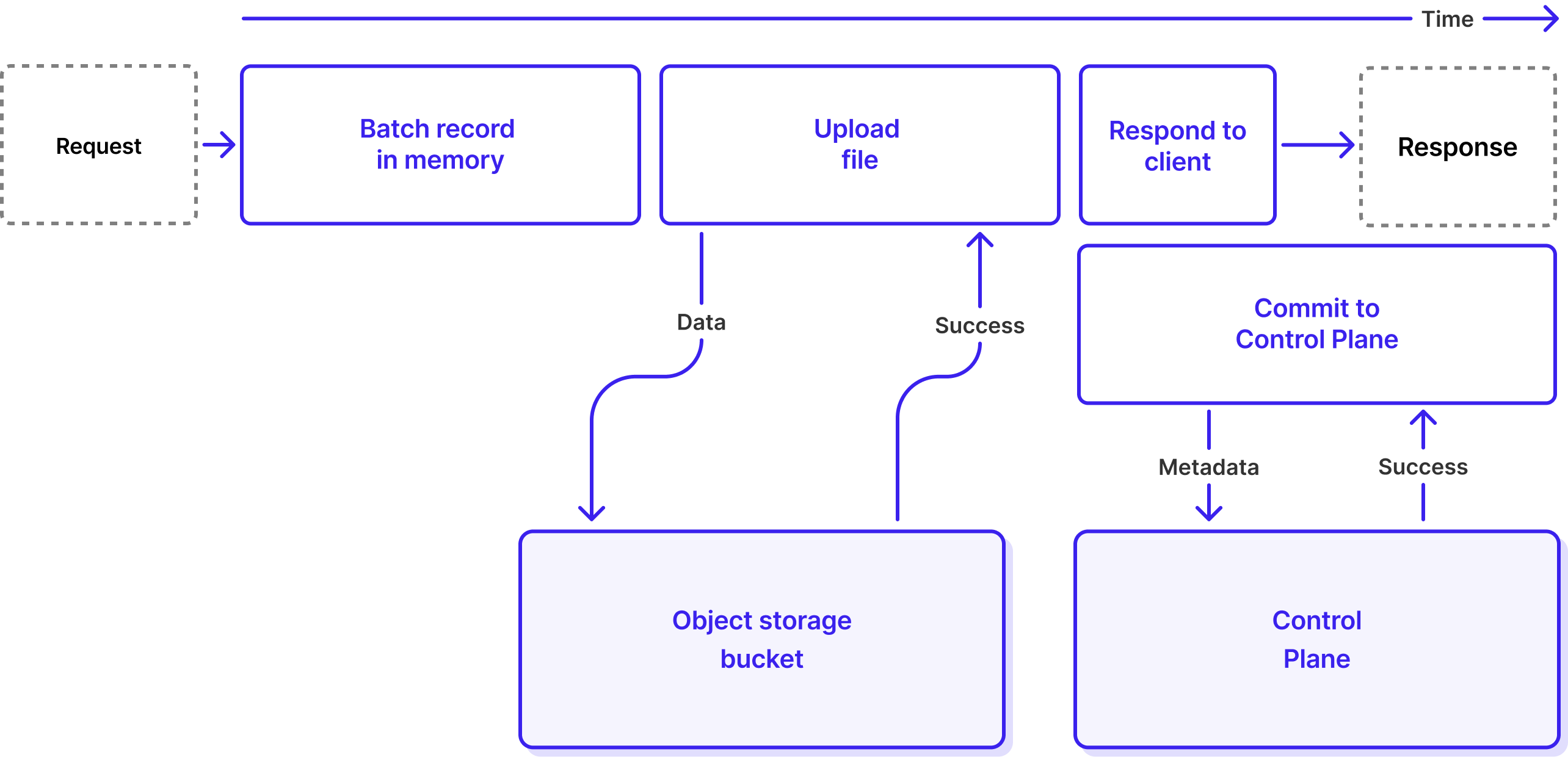
Let’s look at the lifecycle of a Produce request in WarpStream again, but this time for a Lightning Topic. Unlike Classic (non-Lightning) Topic produce requests which have four steps, Lightning Topic produce requests only have three steps before returning a response to the client:
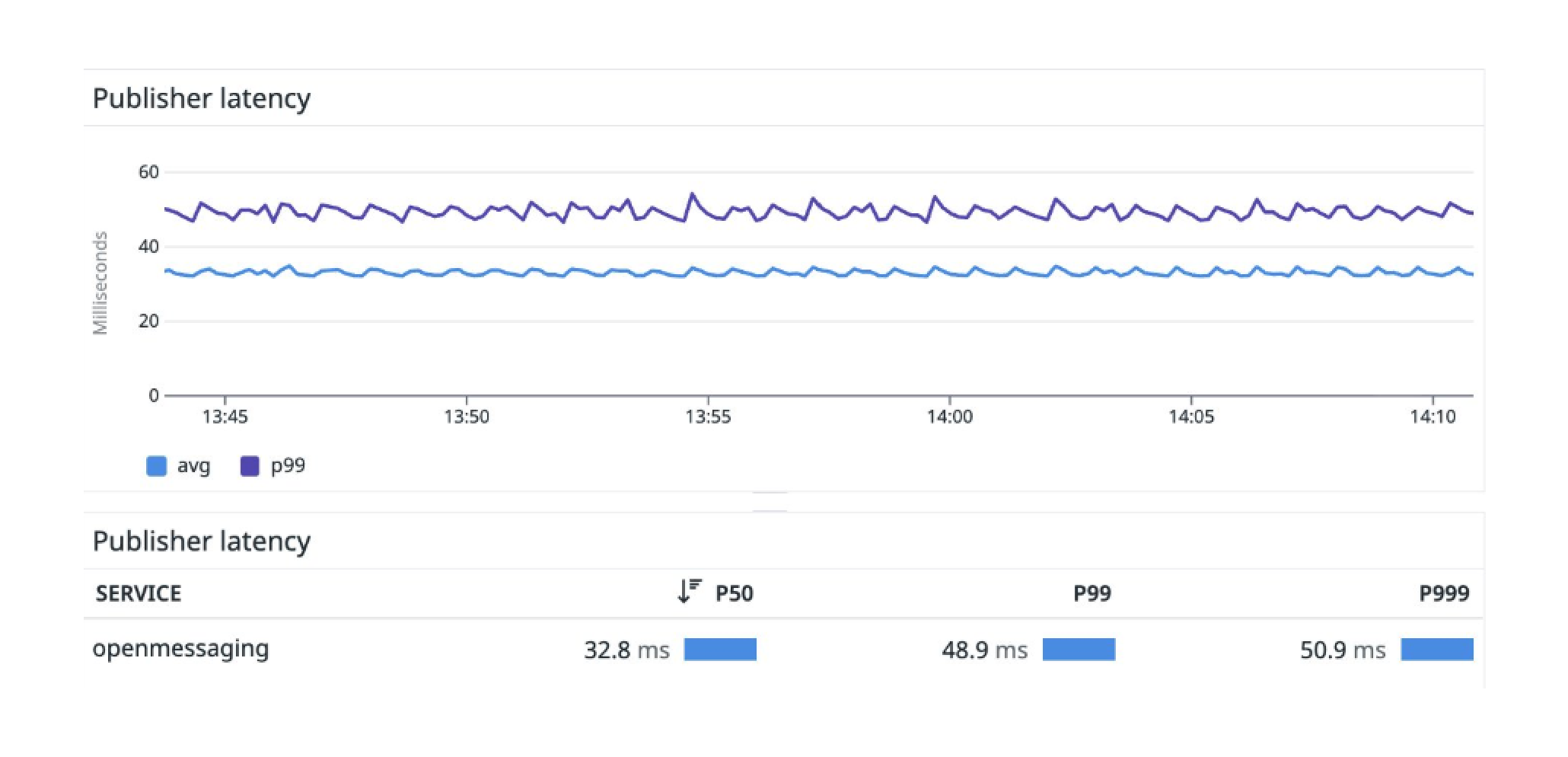
This shorter process cuts the latency of writing data into a “low-latency” WarpStream cluster in half. We ran a small Open Messaging Benchmark workload where we lowered the batch timeout (the amount of time the Agents will wait to accumulate records before flushing a file to object storage) from 50ms to 25ms, and we were able to achieve a median produce latency of just 33ms and a P99 Produce latency of <50ms.
While Lightning Topics decrease produce latency, they have no noticeable effect on end-to-end latency. If we refer back to the LazyLog paper, consumers cannot progress until records have been made durable and they have been sequenced. So while the sequencing is not in the critical path for producers anymore, it is still in the critical path for consumers. For this reason, in Lightning Topics, the sequencing starts immediately after the records have been journaled to S3. This way, the consumers see the data as quickly as they would have if the topic had been a Classic Topic.
The previous section was a bit of an oversimplification. It explains the “happy path” perfectly, but WarpStream is a large-scale distributed system. Therefore we have to take into account how the system will behave when things don’t go according to plan. The most obvious failure mode for Lightning Topics occurs when an Agent acknowledges a write to the client successfully (because the records were durably written to object storage), but then fails to commit the file to the Control Plane asynchronously. This can happen in several different ways:
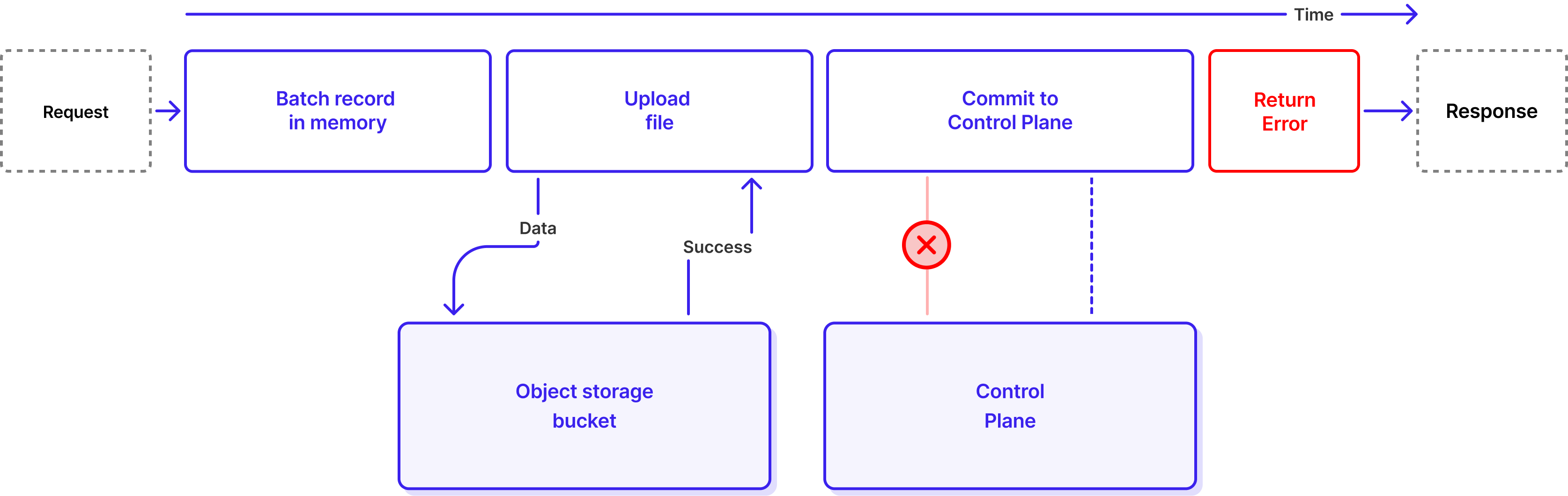
For a Classic Topic, when the Commit phase fails, we return an error to the client, and the client knows it needs to retry.
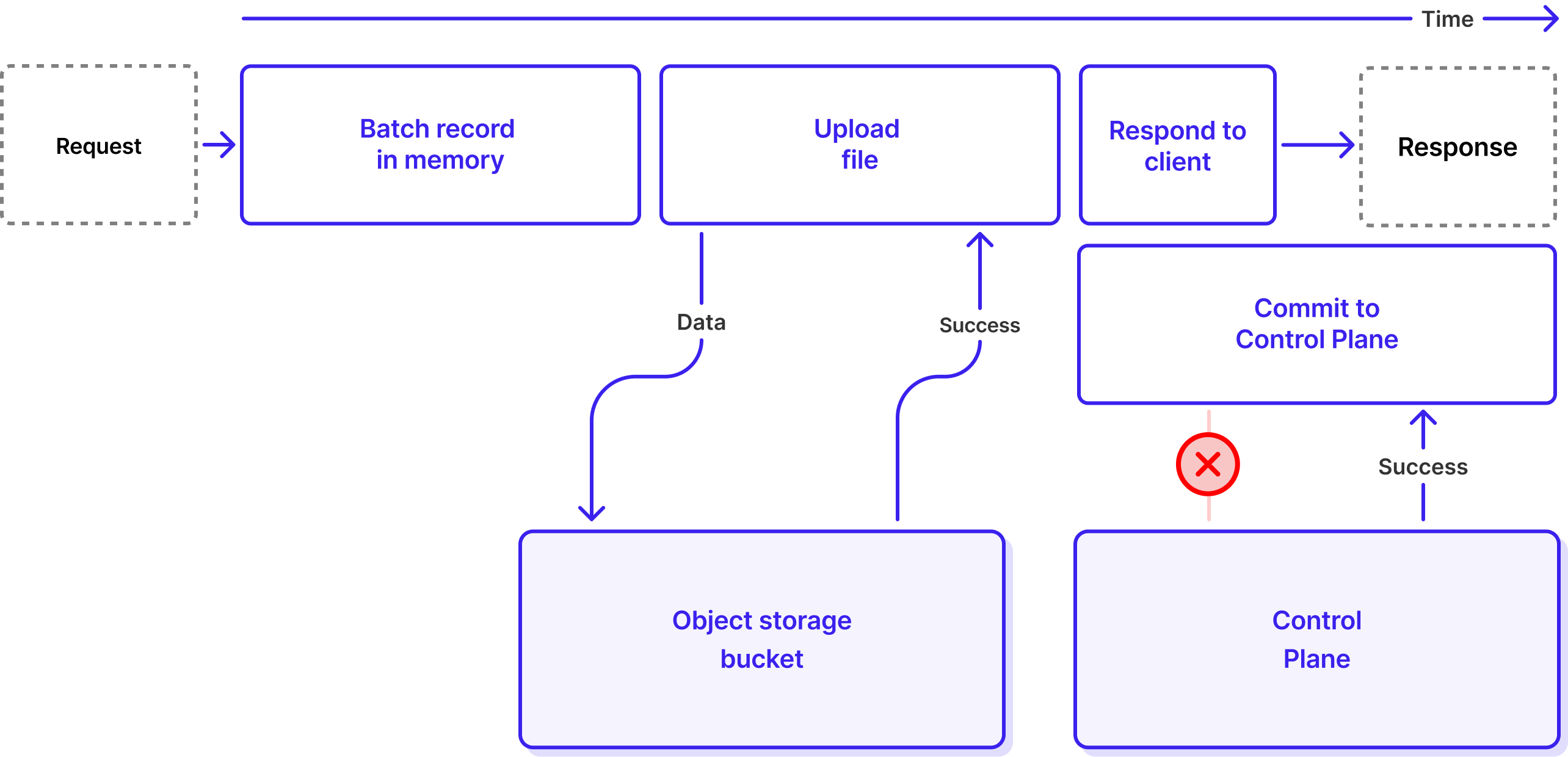
But for a Lightning Topic, it’s too late: the response has already been sent.
If WarpStream let this happen, it would be a big problem because failing to commit a file to the Control Plane is equivalent to data loss. The Agent would tell the client "your data is safely stored", but that data would never actually get sequenced and made visible to consumers. From the customer's perspective, acknowledged data would simply have vanished. In the next section we explain what WarpStream does for this not to happen.
To solve this problem, the Agents need to make sure that every journaled file gets sequenced (eventually). To accomplish this, the Agents run a periodic background job that lists all files in the object storage journal and checks whether they need to be sequenced. This background job also handles expiring stale journal entries.
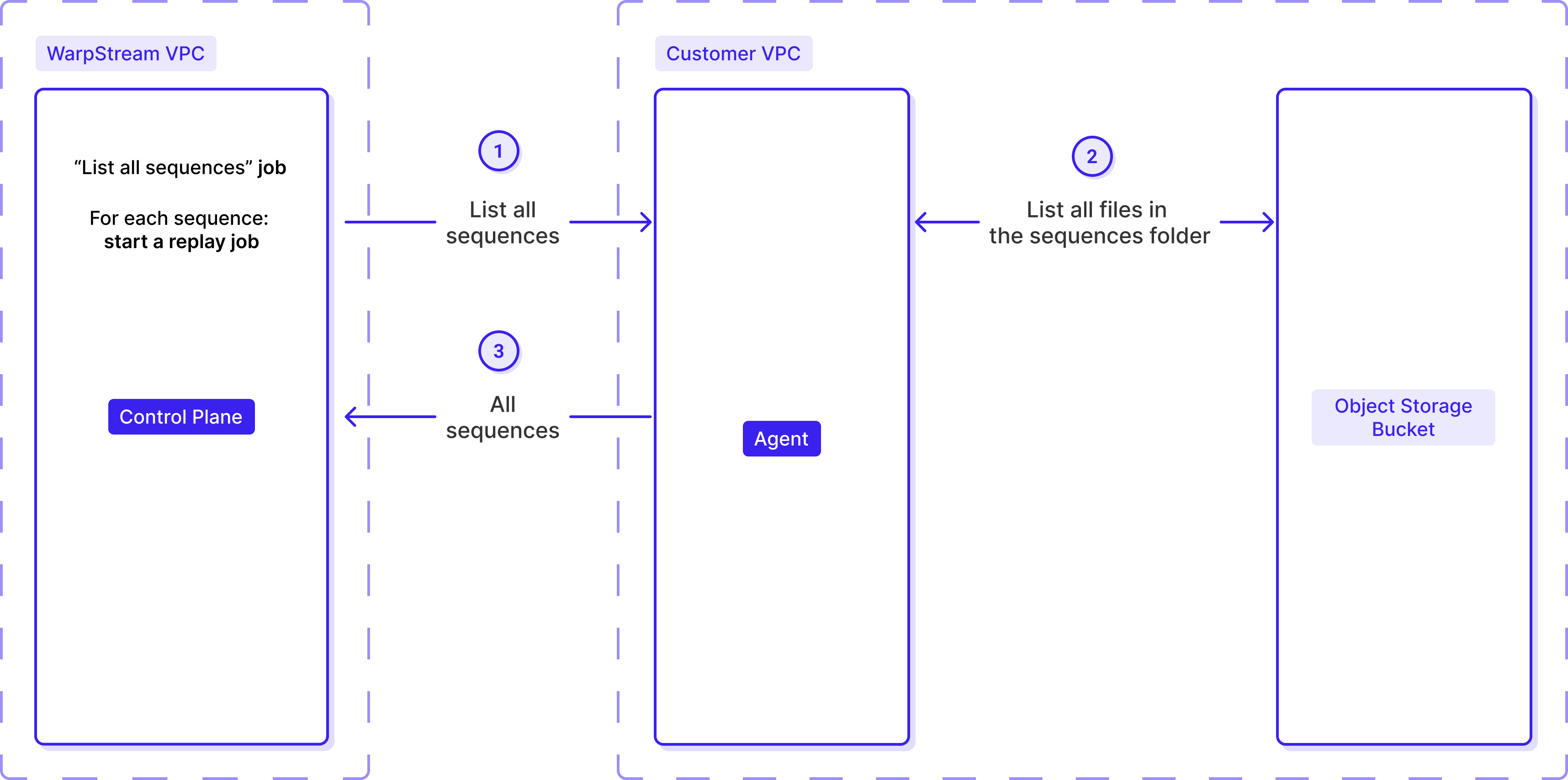
The Control Plane's scheduler periodically assigns scan jobs to Agents, instructing them to list the available sequences. When an Agent reports back with discovered sequences, the scheduler immediately dispatches replay jobs to process each one.
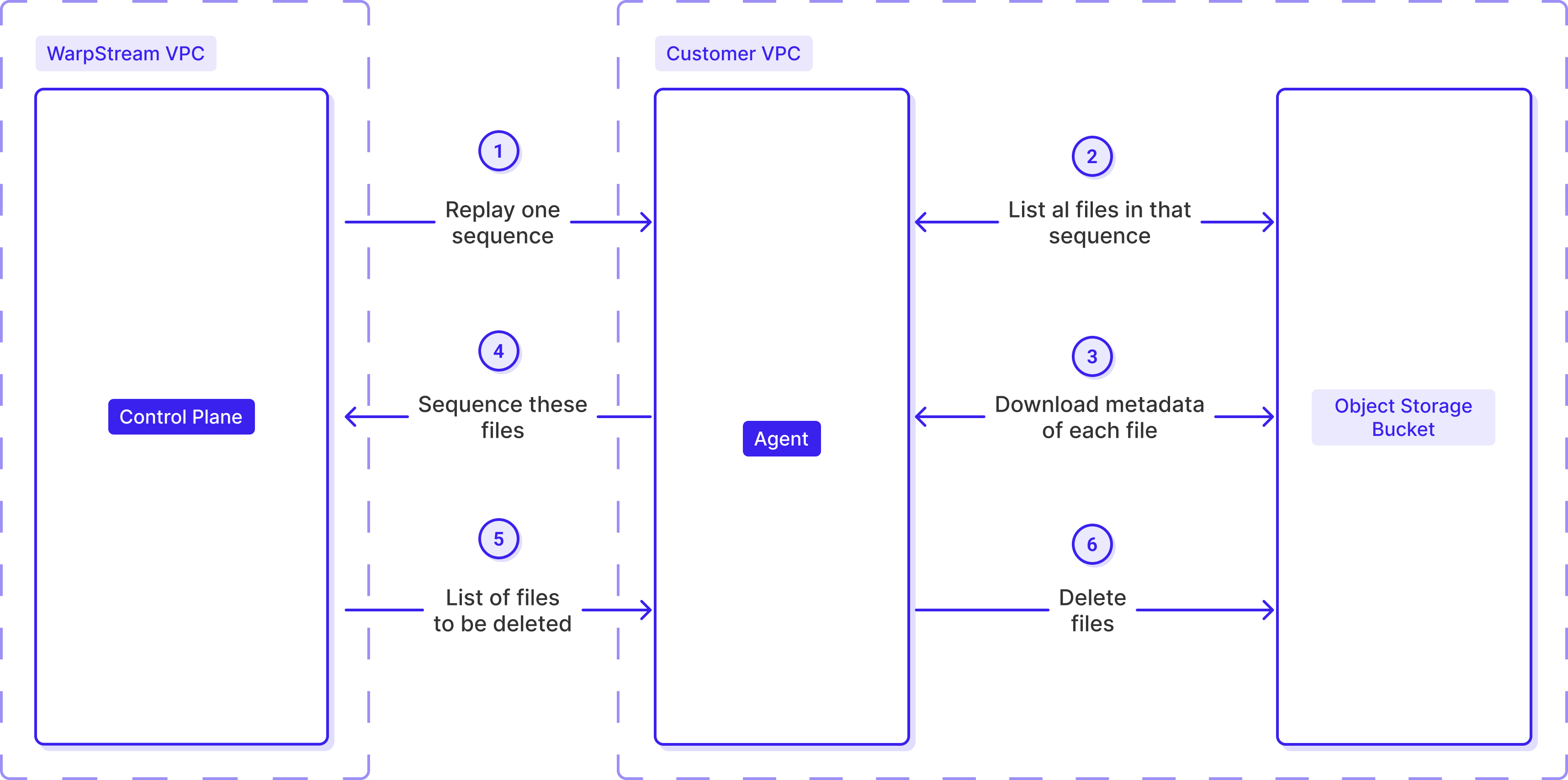
When an Agent receives a replay job for a sequence, it:
Once committed, the data becomes immediately readable by Kafka clients.
As time passes, the compaction process merges these files with the rest of the data. When a file from a sequence has been compacted away, the system marks it as expired and the Agent is allowed to delete it from object storage. Once all files in a sequence are gone, the sequence itself is closed and removed from the scan list — no further work required.
The slow path guarantees zero data loss. Even when the fast path fails to commit files correctly, the slow path ensures 100% of the journaled data is eventually sequenced and made visible to consumers.
We already discussed the trade-offs associated with Lightning Topics earlier: no returned offsets, no idempotent producers, and no transactions. But the existence of the “Slow Path” highlights one additional trade-off with Lightning topics: loss of external consistency.
With WarpStream Classic Topics, if a Kafka client produces one record, gets a successful acknowledgment, and then produces another record and gets a second successful acknowledgement, WarpStream guarantees that the offset of the second message is strictly greater than the offset of the first message (e.g., if it was added after, it is inserted after in the partition).
This is no longer guaranteed to be true with Lightning Topics. For example, the first produce could fail to commit when we try to commit it immediately. By the time the slow path picks it up and commits it to the Control Plane, the second record will already be sequenced, and its offset will be lower than the offset of the first one.
.png)
The keen reader has likely noticed: the slow path guarantees eventual ingestion of Lightning Topic files, even when the Control Plane is unavailable. This is a useful property because it means, at least in theory, that Lightning Topics should be able to continue to store data even if the Control Plane is completely unavailable – whether from a networking issue, regional cloud provider outage, or incident in WarpStream's Control Plane itself.
This data won't be immediately available to consumers of course (remember, sequencing is in the critical path of consumers, but not producers), but producers can keep accepting data without interruption. This is critical for customers who cannot backpressure their data sources — applications that must either write records immediately or drop them entirely. With Lightning Topics, those records are journaled to object storage, waiting to be sequenced once the Control Plane recovers.
Unfortunately, Lightning Topics are not enough to guarantee uptime even when the Control Plane is unavailable. One reason is that most clusters will contain a mixture of Classic and Lightning Topics, and so even if the Lightning Topics keep working, there’s a chance that client retries for the Classic Topics generates so much additional load on the Agents that it disrupts the Lightning Topics. Worse, the Agents have other dependencies (like the Agent’s service discovery system, and internal caches with maximum staleness guarantees) that are dependent on the Control Plane being available for continued functioning.
As a result of all this, we developed a separate feature called “Ripcord Mode”. At a very high level, Ripcord Mode is a flag that can be set on Agent deployments that causes them to treat all topics as if they were Lightning topics. In addition, Ripcord Mode modifies the behavior of several internal systems to make them resilient to Control Plane unavailability. For example, when Ripcord Mode is enabled:
We tested Ripcord extensively, including by running continuous interruptions that happen multiple times every day in some of our internal test clusters. Below, we demonstrate the results of one of our manual tests where we disrupted the connection between the Agents and the Control Plane for roughly one hour.
Agents continued accepting Produce requests the whole time. A backlog of files waiting to be ingested built up and then slowly receded when the Agents were allowed to reconnect to the Control Plane. Success!
.png)
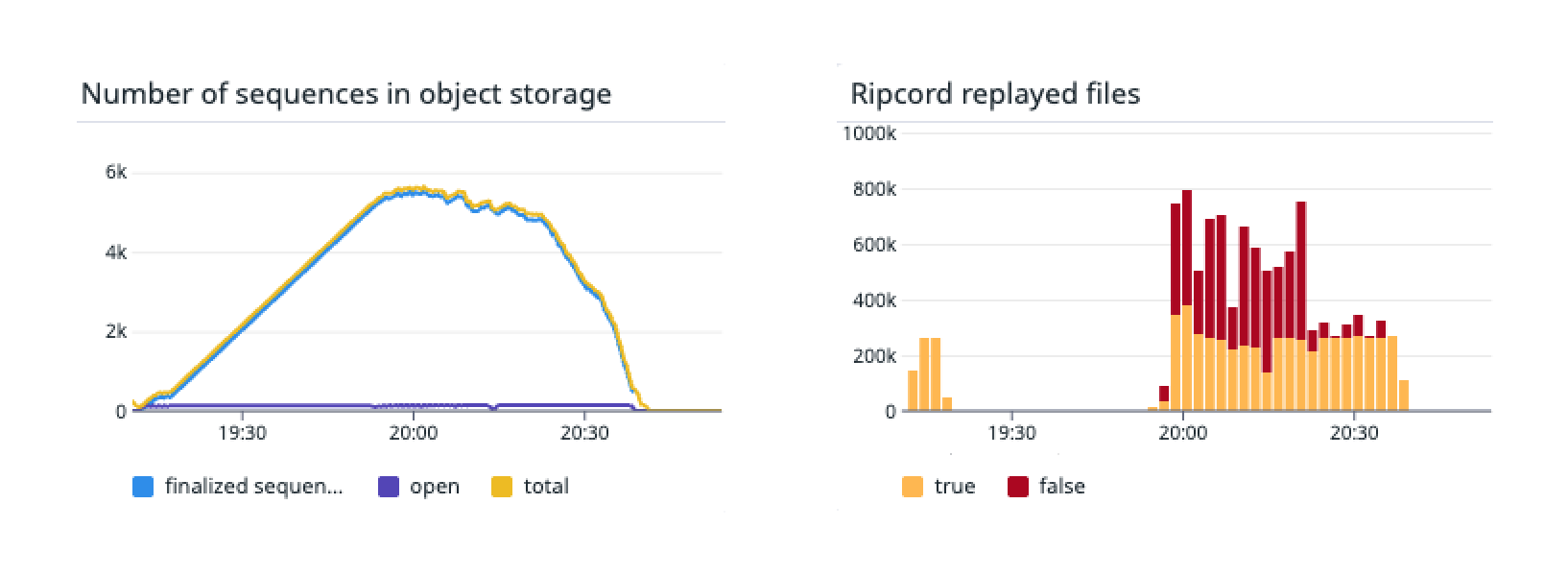
While Agents can continue accepting writes, any operation requiring Control Plane metadata will still fail if the Control Plane is unavailable.
What remains blocked:
Also, new Agents cannot start when the Control Plane is unavailable. The WarpStream Agent caches a lot of information from the Control Plane, and the only way these caches can be warmed up is by loading it from the Control Plane. For this reason, currently, you cannot start (or restart) an Agent while the Control Plane is unavailable.
We will invest in this area in the future, and probably keep a copy of these caches in the object storage bucket to make it possible to start a new Agent entirely without a connection to the Control Plane. Currently, an Agent will fail during initialization if it cannot reach the Control Plane.
Both Lightning Topics and Ripcord Agents are Generally Available starting today.
Or start the Agent in Ripcord Mode with <span class="codeinline">-enableRipcord</span> as explained in the documentation.

.svg)
